DashWork: our own freelancer dashboard — clients, time and invoicing backup in one place
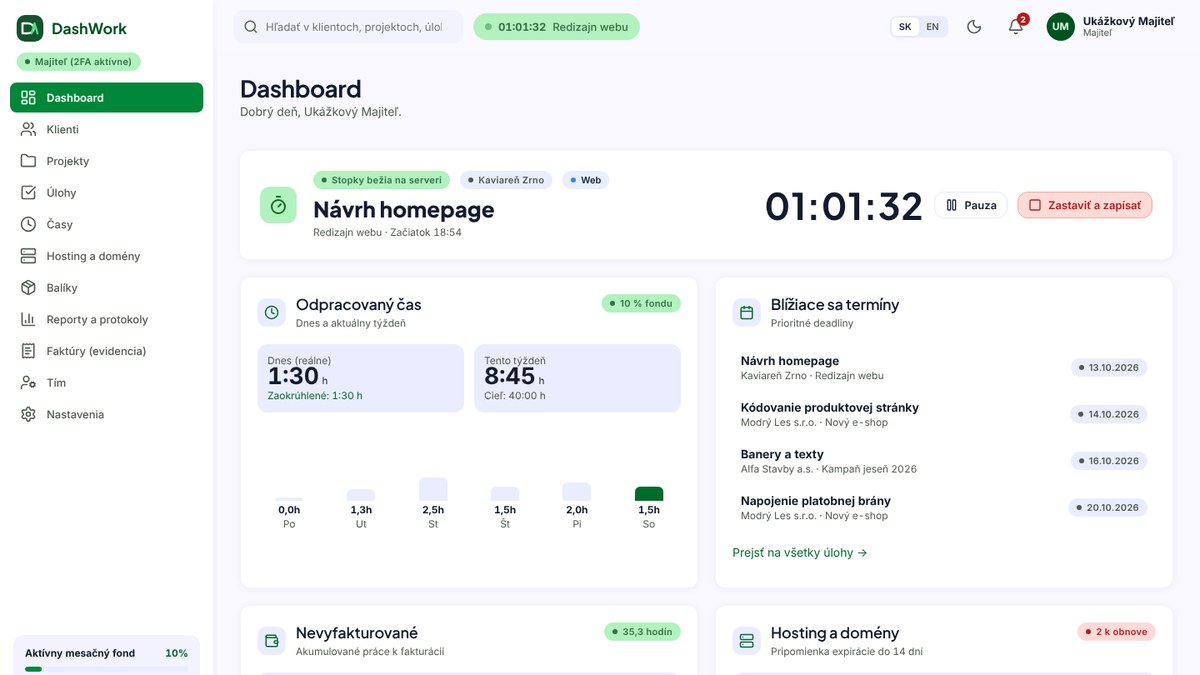
A freelancer or small studio usually juggles several tools at once: a spreadsheet for time, notes for tasks, email for clients, and yet another tool for invoices. Data ends up entered more than once, and things slip through the cracks.
So we built DashWork — our own web application where everything happens in one place: clients, projects, tasks, time tracking, pricing and invoicing groundwork, client hosting and domains, and recurring monthly services. Logged time turns into a price, the price into a work report, and the report into invoicing groundwork — without retyping anything.
DashWork runs at dashboard.mlynar.org as our own installation on regular shared hosting. To a random website visitor it's invisible — all they see is the login page, nothing else.
Who it's for
- a freelancer or sole trader working for several clients at once,
- a small studio with colleagues — a colleague sees only their own work and projects, prices stay hidden from them,
- anyone who, besides the work itself, also manages clients' domains, hosting and recurring services (social media management, a Google Ads account, and similar).
It's worth being upfront about what DashWork isn't, too: it isn't accounting software. It doesn't generate invoices — it prepares the groundwork and keeps a record of invoices already issued (more on that in "What DashWork deliberately doesn't do" below).
A day with DashWork: dashboard, timer, tasks
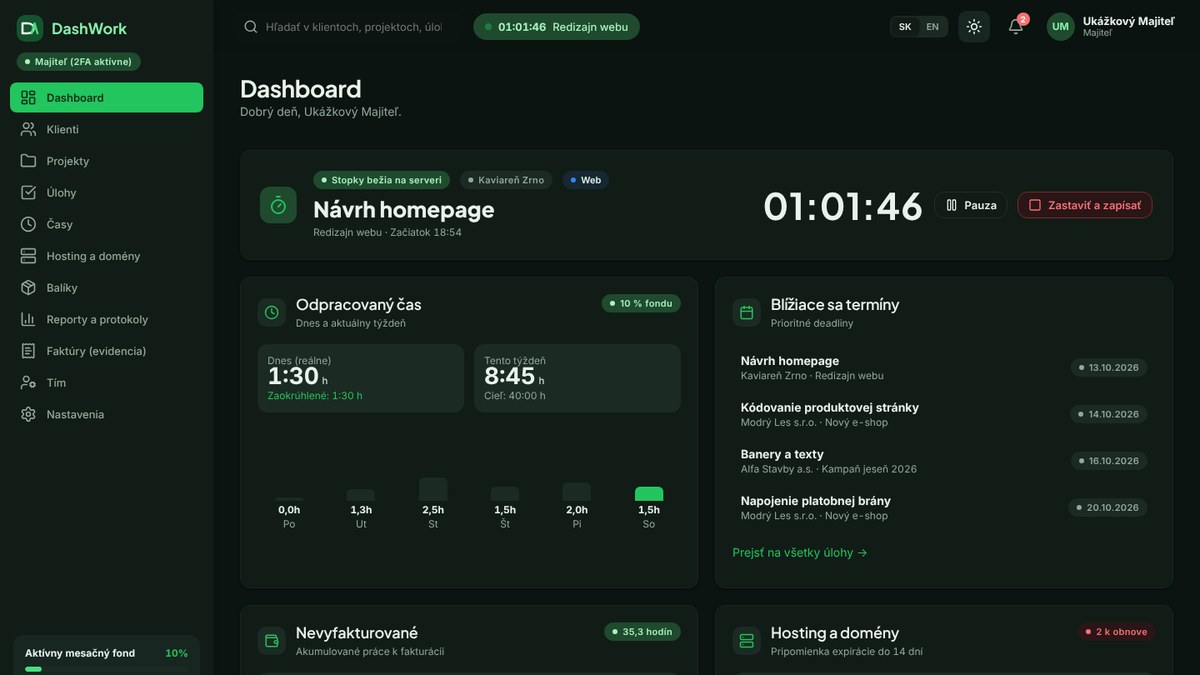
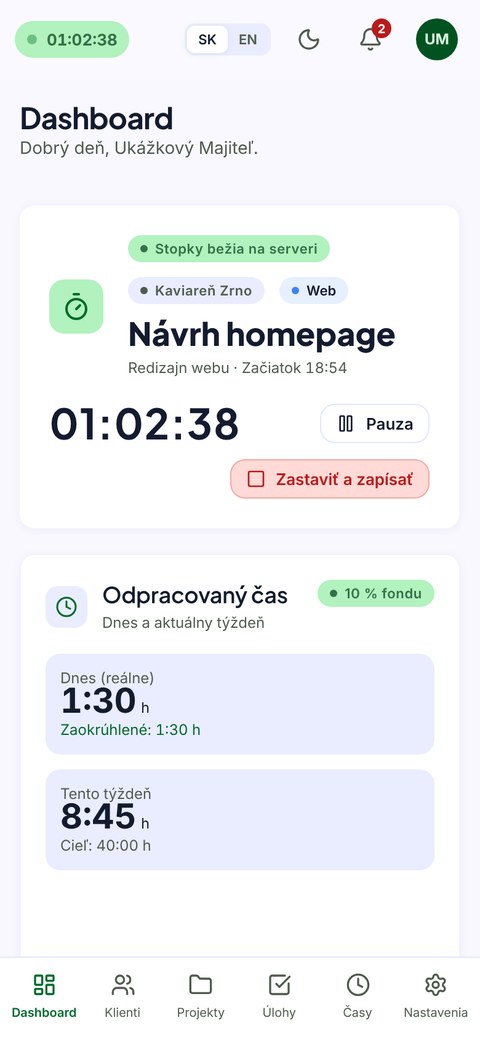
The dashboard shows everything that matters at a glance: a running timer (it measures time on the server, so it keeps going even after the browser is closed), time logged today and this week, upcoming deadlines, unbilled work with the amount including VAT, hosting services nearing expiry, and the monthly profit — visible to the owner only.
Tasks are organized on a Kanban board as well as in a table view — statuses for to-do, in progress, waiting on client, on hold and done, with priority, assignee, deadline and estimated hours.

From logged hours to invoicing groundwork
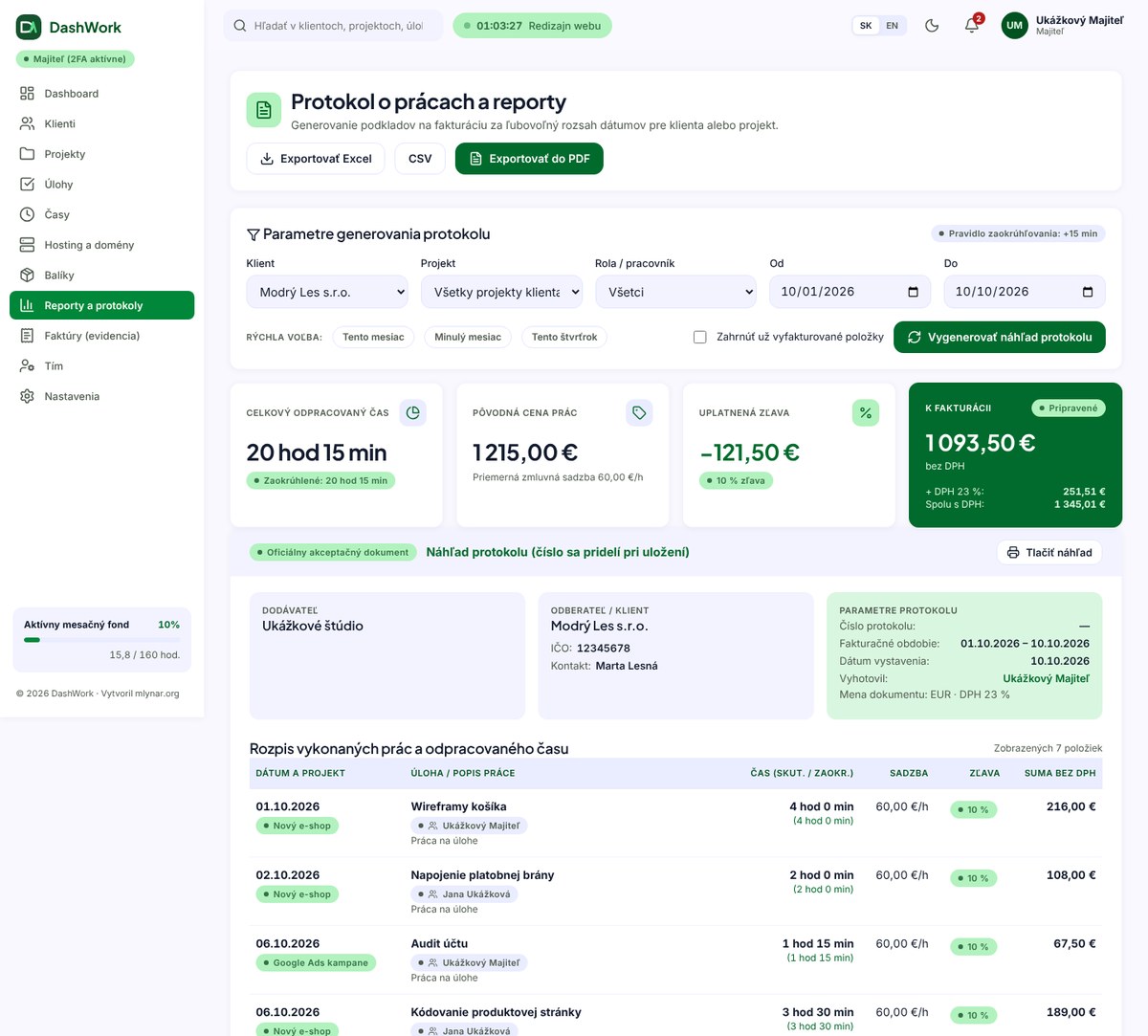
This is the core of the whole app: time is logged manually or with the timer, rounded up to 15 minutes per day and project when the price is calculated, and priced using a project → client → studio default rate rule (discounts don't stack, the highest one applies).
From the accumulated time you can generate a work report for any period, for a specific client or project — with a line-item breakdown, the discount applied, VAT, and space for signatures. The report can be exported to PDF, Excel and CSV.
DashWork doesn't issue invoices itself — it only keeps a record of them (number, amount, due date, status). Once time entries are linked to an invoice, they're locked so they can't be changed by mistake.
Recurring monthly services
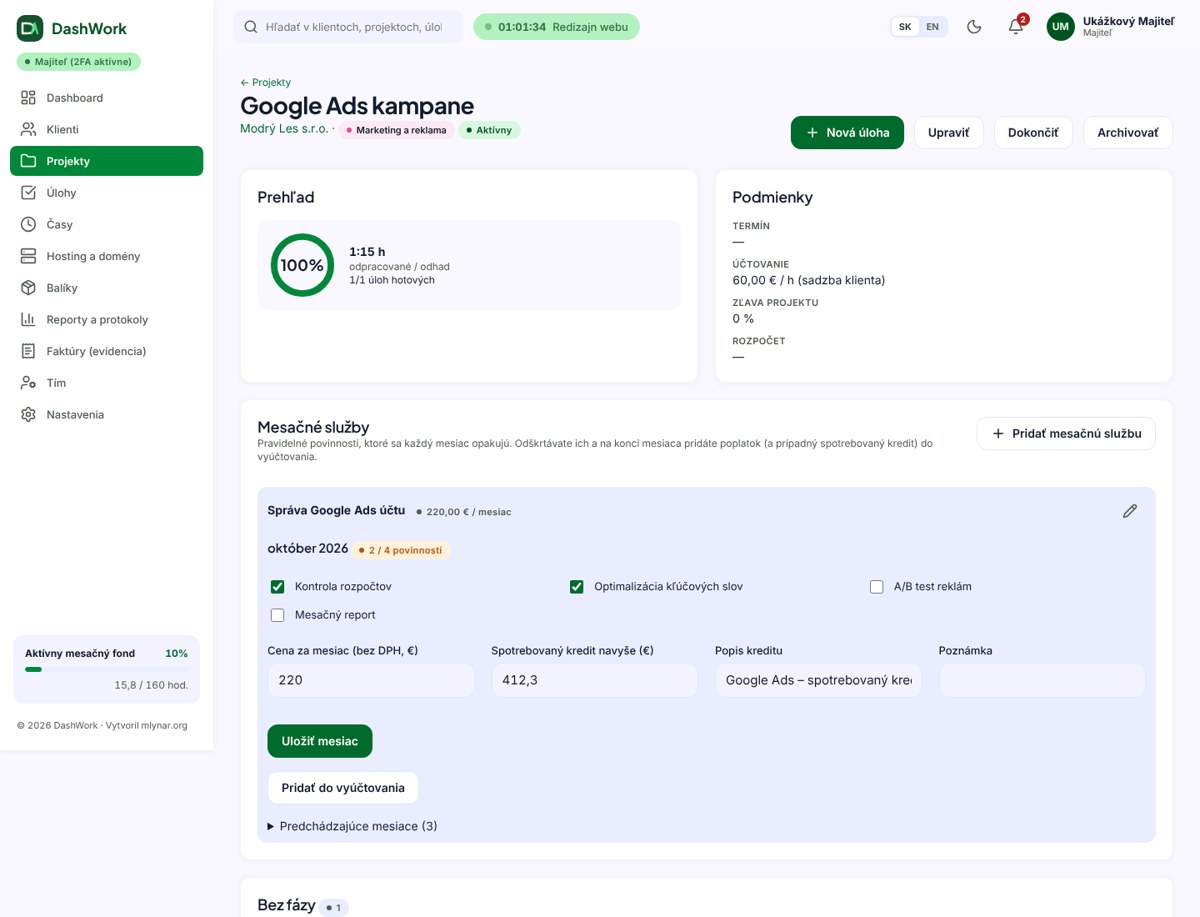
A lot of client work isn't a one-off project but a recurring monthly service — social media management, running a Google Ads account, and the like. DashWork has a dedicated module for this: the same checklist of duties gets ticked off every month, the monthly price can be adjusted for a specific month, and the service can also carry consumed credit (e.g. an ad budget) with a description.
One click adds the month to the billing as a fee and credit — as separate line items, with the client's discount applied only to the fee, not to the passed-through credit. A colleague can tick off duties too, without ever seeing the prices.
Client hosting and domains under control
For a studio that also manages clients' websites, it's typical to track domain and hosting expiry separately from everything else. DashWork ties it into the same system: every domain and hosting entry carries both the price charged to the client and the actual cost (so the margin is visible at a glance), a reminder goes out by email and in the notification bell 14 days before expiry, and a one-click renewal extends it by a year and creates a billing line item right away.
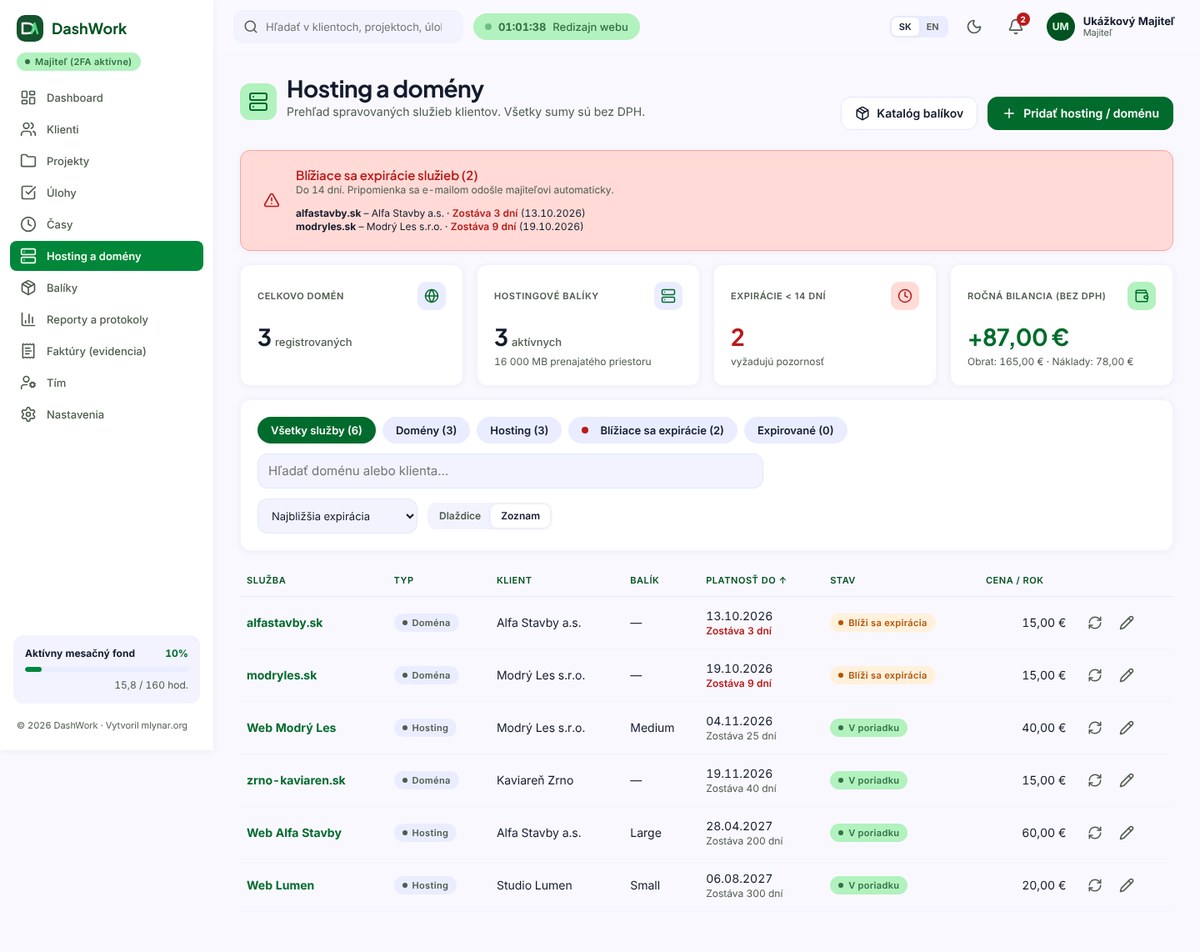
Entries are added manually — DashWork doesn't connect directly to registrars or hosting providers. For its own catalog of hosting plans (Small through TOP) there are preset prices and costs you can adjust to your own.
Security first
Since the app holds sensitive client data and pricing, we paid particular attention to security:
- To a website visitor, DashWork is invisible — only the login page exists publicly, everything else runs behind the app's own protected front end.
- Mandatory two-factor authentication (a TOTP app plus backup codes) for the owner and admin; a trusted device can skip re-verification for 14 days.
- Automatic logout after 60 minutes of inactivity, and protection against password guessing.
- A strict content security policy (CSP) — no inline scripts, no loading from Google Fonts, local fonts only.
- Role-based permissions: a colleague sees only their own projects and tasks and never sees prices; a "read-only" role can't change anything.
- An audit log of key actions, and encrypted two-factor secrets.
- GDPR compliance — exporting your own data, anonymizing client contacts, deleting a colleague's account.

Backup and restore
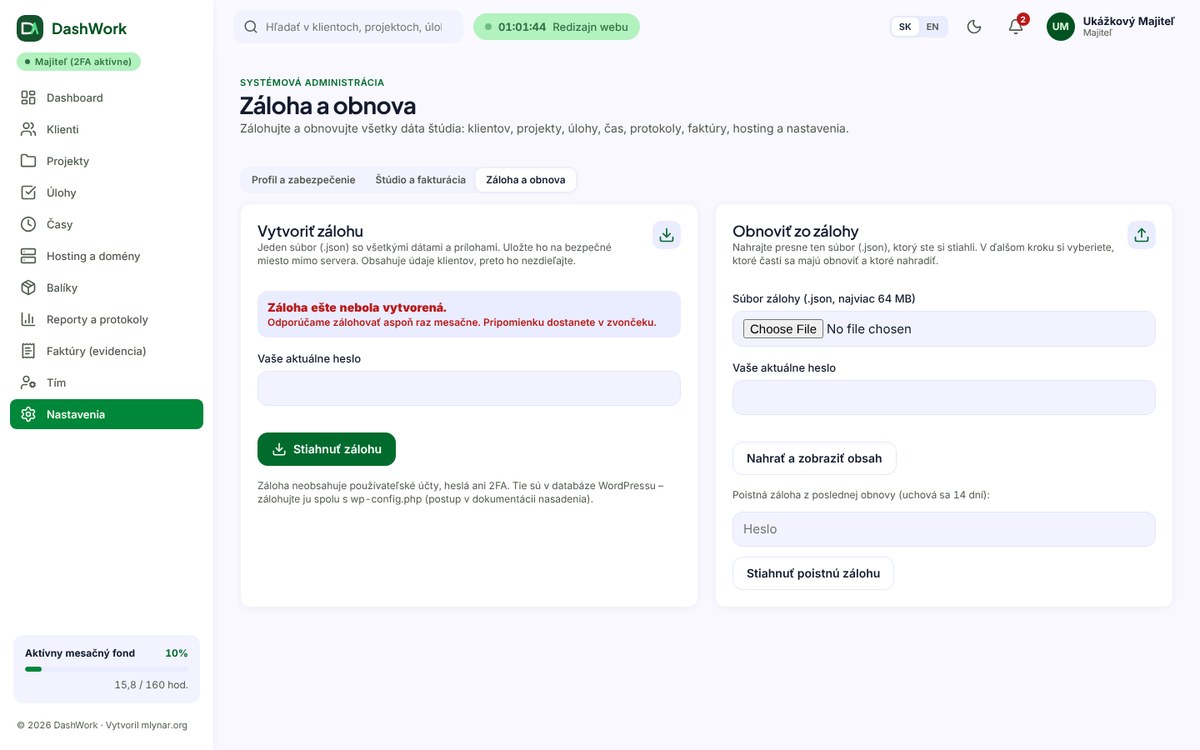
All of a studio's data can be downloaded with a single click as one .json file — attachments included. Both download and restore require a password, a reminder appears in the notification bell after 30 days without a backup, and on restore you choose which parts to fill in or replace (clients, projects, time, reports and invoices, hosting, plans, settings). Before a restore, a safety copy of the current state is saved automatically so you can roll back — a restore completes fully, or not at all.
On mobile and in dark mode
The interface is fully responsive, switching to bottom navigation on mobile, and anyone who prefers working in the evening will appreciate dark mode, toggled right in the header alongside the language switch (Slovak and English).
What DashWork deliberately doesn't do
In the interest of honesty, this belongs in the article too — DashWork doesn't set out to be everything for everyone:
- It doesn't generate invoices — it prepares the groundwork (a work report) and keeps a record of invoices already issued.
- It doesn't connect to domain registrars or hosting providers — expiry dates and prices are entered manually.
- Looking a client up by company ID fills in only the name and address, not the VAT number.
- It isn't a multi-tenant SaaS — one installation serves one studio.
- It has no dedicated mobile app; it's used through the browser (with an adapted mobile layout).
Summary of benefits
- One place instead of five tools — clients, projects, tasks, time, hosting and invoicing groundwork together.
- Straight from hours to invoicing — automatic pricing, rule-based discounts, and an exportable work report.
- Full visibility into clients' hosting and domains, with expiry, pricing, margin, and one-click renewal.
- Recurring monthly services with a duty checklist and consumed credit.
- Security on par with a professional tool — mandatory 2FA, an audit log, a strict content policy.
- No monthly license fees — just regular hosting and a domain, your data stays with you.
Frequently asked questions
Does DashWork issue invoices itself? No. DashWork prepares the groundwork — a work report with the amount to invoice — and keeps a record of invoices already issued (number, amount, due date, status). Issuing the actual invoice is left to your accounting software or template.
Can DashWork be used as a regular SaaS for several studios at once? No, it isn't a multi-tenant service. One installation serves one studio — exactly how we built it for ourselves.
Is there a monthly fee for DashWork? No. It runs as our own installation on regular shared hosting, so the only cost is hosting and the domain — no license or subscription.
How is client data protected in the app? Mandatory two-factor authentication for the owner and admin, automatic logout after inactivity, protection against password guessing, a strict content security policy, and an audit log of key actions.
What's next
DashWork is the first in-house tool we're covering on the blog — and more plugins and extensions we build for ourselves and our clients will follow here over time. If you're dealing with a similar problem — scattered spreadsheets, tools and tools-for-tools — or you're curious about a system custom-built for your own studio, get in touch at info@mlynar.org.
Got a question about this topic?
We're happy to advise on your specific situation too — get in touch.
Send a message